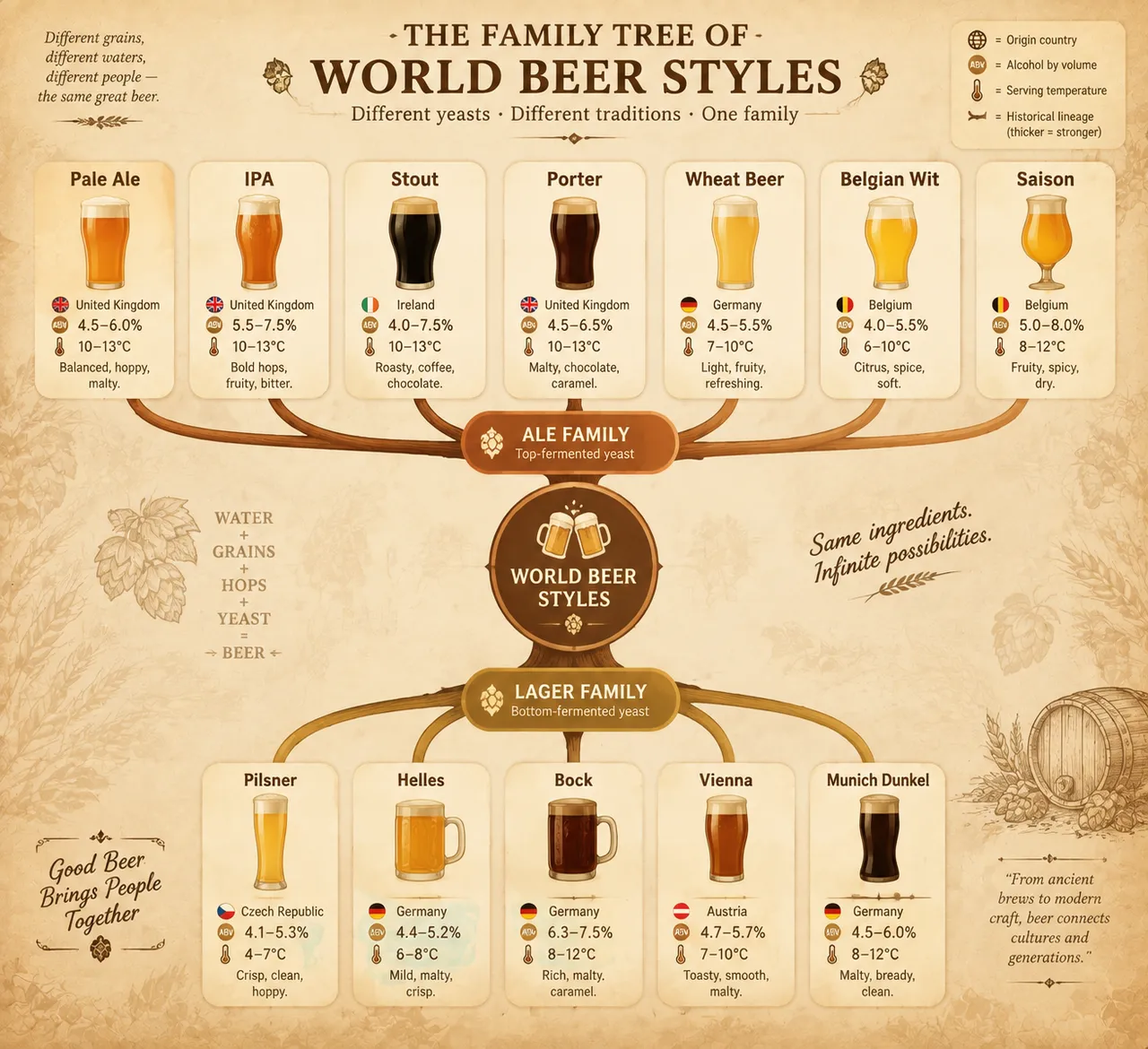
पारिवारिक वृक्ष की शैली में दुनिया की बीयर शैलियाँ दर्शाई गई हैं — एल और लागेर की दो मुख्य डालियों में IPA, स्टाउट आदि बँटी हैं। हर नोड पर अल्कोहल प्रतिशत और अनुकूल सेवन-तापमान अंकित है, और पूरी रंगत गर्म पब जैसी है।
पूरा प्रॉम्प्ट (अंग्रेज़ी में)
Infographic poster presenting a family tree of the world's beer styles, front-view flat presentation. Layout: a branching tree diagram rooted at the bottom center with the ale and lager yeast families as two main trunks: the ale branch (top-fermented) splitting into pale ale, IPA, stout, porter, wheat beer, Belgian wit and saison; the lager branch (bottom-fermented) splitting into pilsner, helles, bock, Vienna and Munich dunkel. Each style node is a rounded card with a flat beer-glass icon, origin country, alcohol-by-volume percentage and typical serving temperature, with branch lines whose thickness encodes historical lineage. Color system: golden amber (#F2B441), barley gold (#D9A441), chestnut brown (#8B5E3C), deep black stout (#2B2B2B) and cream foam white (#FFF8E7) on a warm tavern background (#F5EDE0). Typography: classic serif for style names, clean sans-serif data captions. Background: subtle barley-grain texture with faint hop-cone pattern. Data feel: brewing-reference chart with lineage branches and style statistics. Lighting: warm pub-light glow from the upper right, soft shadows, inviting amber tones. 4k
वैसा ही चित्र बनाएँ:
ऊपर दिया प्रॉम्प्ट कॉपी करें → ChatGPT खोलें → पेस्ट करके भेजें (इमेज मॉडल बदल सकते हैं) → नतीजे का इंतज़ार करें।
अक्सर पूछे जाने वाले सवाल
यह चित्र कैसे बनाएँ?▾
ऊपर दिया अंग्रेज़ी प्रॉम्प्ट कॉपी करें, फिर ChatGPT खोलें, इमेज मॉडल पर स्विच करें, पेस्ट करके भेजें और मिलते-जुलते चित्र का इंतज़ार करें।
कौन सा AI टूल इस्तेमाल करना चाहिए?▾
सुझाव: ChatGPT। लंबे अंग्रेज़ी प्रॉम्प्ट को सपोर्ट करने वाला चैट-आधारित इमेज जनरेटर मिलते-जुलते नतीजे दे सकता है।
क्या मैं इस प्रॉम्प्ट को अपनी पसंद के अनुसार बदल सकते हैं?▾
हाँ। बस विषय, स्टाइल, रंग और कंपोज़िशन के शब्द अपने हिसाब से बदलें; विवरण आमतौर पर बदलने योग्य हिस्से बता देता है (जैसे: swap X for Y)।
क्या नमूना चित्र मुफ़्त में इस्तेमाल किए जा सकते हैं?▾
नमूना चित्र इस साइट ने उसी प्रॉम्प्ट से बनाए हैं और सिर्फ़ प्रदर्शन के लिए हैं। प्रॉम्प्ट की सामग्री आज़ादी से कॉपी और इस्तेमाल की जा सकती है; व्यावसायिक उपयोग के लिए अपने द्वारा इस्तेमाल किए गए AI टूल की शर्तें देखें।