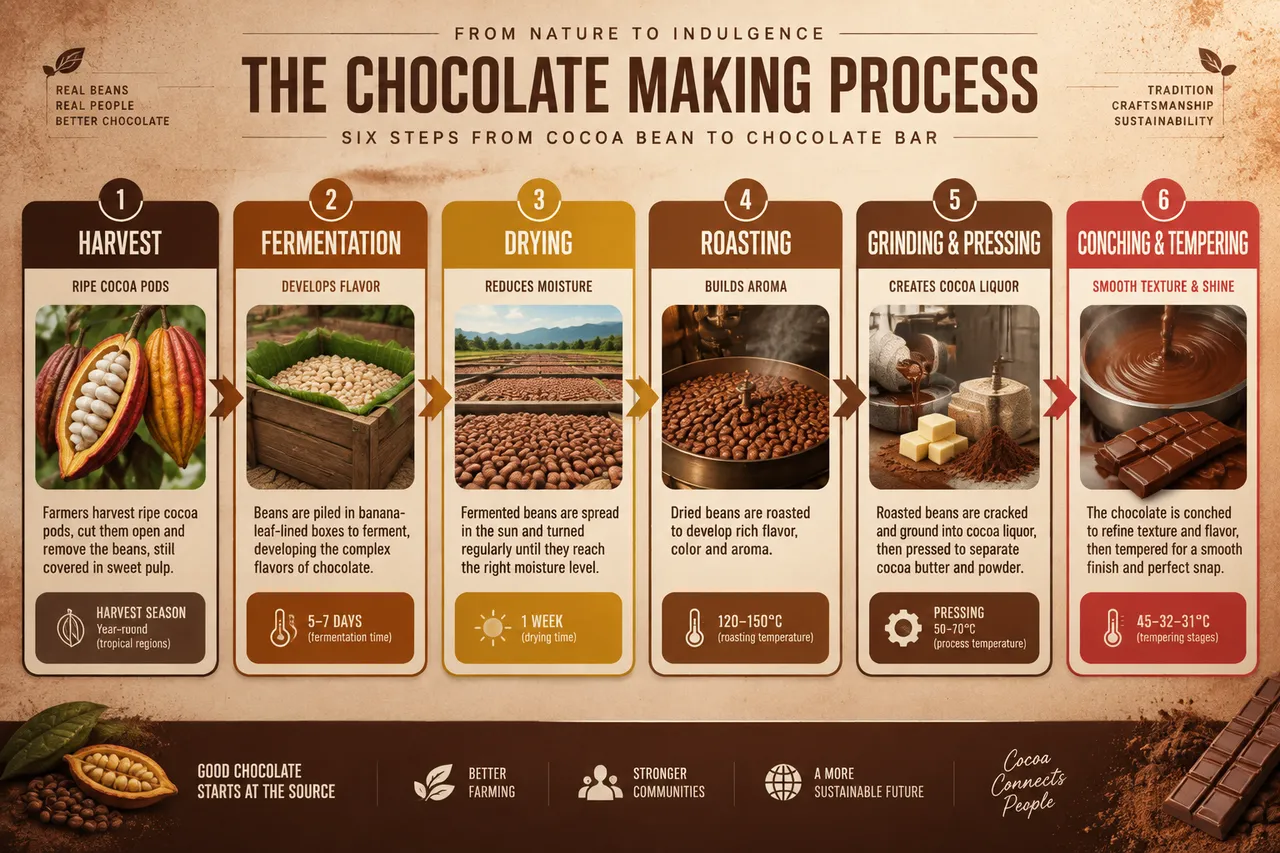
छह-चरण वाला फ़्लोचार्ट कोको की फली से चॉकलेट बार तक का पूरा सफ़र दिखाता है — केले की पत्तियों में किण्वन, 120–150 डिग्री सेल्सियस पर भूनना, पीसना और परिष्करण जैसे हर चरण पर तापमान व अवधि अंकित है। पूरी रंगत गहरी भूरी और गर्म है।
पूरा प्रॉम्प्ट (अंग्रेज़ी में)
Infographic poster documenting the chocolate production process from cocoa bean to finished bar, front-view flat presentation. Layout: a horizontal six-stage flowchart running left to right across the full width: harvest (cracked cocoa pods), fermentation (5-7 days in banana-leaf-lined boxes), drying in the sun (one week), roasting at 120-150°C, grinding into cocoa liquor and pressing into cocoa butter and powder, then conching and tempering to form the finished bar. Each stage sits in a rounded card with a flat icon, a one-line description, and a temperature or duration data badge. A thin progress arrow with gradient color connects the stages. Color system: rich chocolate browns (#4E2A17, #6F3E1F), cacao gold (#D4A017), cream (#F7F0E3) and a red accent (#C0392B) for the final bar stage. Typography: bold condensed sans-serif titles, medium descriptions, small data captions. Background: subtle cocoa-powder speckle texture with a soft warm vignette. Data feel: artisan factory guide with precision temperature and time labels. Lighting: warm diffused light from the upper right, soft shadows under cards, appetizing matte finish. 4k
वैसा ही चित्र बनाएँ:
ऊपर दिया प्रॉम्प्ट कॉपी करें → ChatGPT खोलें → पेस्ट करके भेजें (इमेज मॉडल बदल सकते हैं) → नतीजे का इंतज़ार करें।
अक्सर पूछे जाने वाले सवाल
यह चित्र कैसे बनाएँ?▾
ऊपर दिया अंग्रेज़ी प्रॉम्प्ट कॉपी करें, फिर ChatGPT खोलें, इमेज मॉडल पर स्विच करें, पेस्ट करके भेजें और मिलते-जुलते चित्र का इंतज़ार करें।
कौन सा AI टूल इस्तेमाल करना चाहिए?▾
सुझाव: ChatGPT। लंबे अंग्रेज़ी प्रॉम्प्ट को सपोर्ट करने वाला चैट-आधारित इमेज जनरेटर मिलते-जुलते नतीजे दे सकता है।
क्या मैं इस प्रॉम्प्ट को अपनी पसंद के अनुसार बदल सकते हैं?▾
हाँ। बस विषय, स्टाइल, रंग और कंपोज़िशन के शब्द अपने हिसाब से बदलें; विवरण आमतौर पर बदलने योग्य हिस्से बता देता है (जैसे: swap X for Y)।
क्या नमूना चित्र मुफ़्त में इस्तेमाल किए जा सकते हैं?▾
नमूना चित्र इस साइट ने उसी प्रॉम्प्ट से बनाए हैं और सिर्फ़ प्रदर्शन के लिए हैं। प्रॉम्प्ट की सामग्री आज़ादी से कॉपी और इस्तेमाल की जा सकती है; व्यावसायिक उपयोग के लिए अपने द्वारा इस्तेमाल किए गए AI टूल की शर्तें देखें।