विंटेज फ़ोटोग्राफ़ी सुझाव: ChatGPT
विंटेज फ़ोटोग्राफ़ी: सुबह की रोशनी में 80 के दशक का वॉकमैन
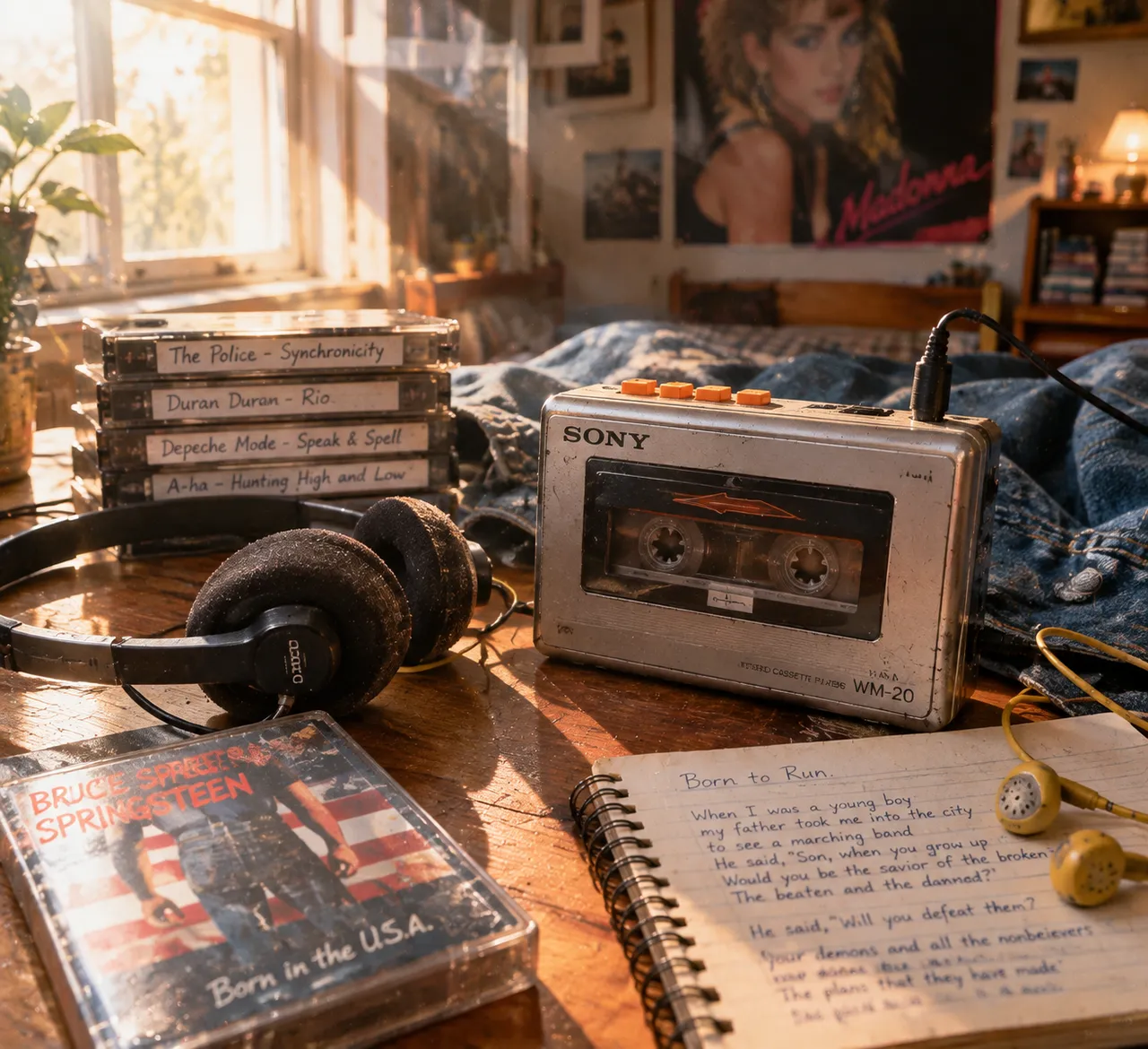
चाँदी जैसे शरीर और नारंगी बटनों वाला वॉकमैन डेनिम जैकेट पर रखा है, पारभासी कैसेट में घूमती रील दिखती है, सुबह की रोशनी मेज़ पर तिरछी पड़ती है।
पूरा प्रॉम्प्ट (अंग्रेज़ी में)
Photorealistic close-up shot of a classic 1980s portable cassette player with silver metal casing and orange plastic buttons, a translucent cassette with visible tape reels inside, worn black foam headphones beside it, a tangle of yellow earbud cords, a pile of cassette tapes with handwritten labels next to it, set on a denim jacket and a spiral notebook with handwritten lyrics, a cassette case with album artwork, a poster of a pop star on the wall behind, warm morning light from a window on the left with sunbeams crossing the desk, soft shadows, shallow depth of field with a blurred bedroom background, slightly scratched casing with scuffed corners, dominant silver, orange and denim-blue palette, low camera angle at tabletop level, nostalgic 80s mood with film grain, photorealistic metal, plastic and foam texture, cinematic, 4k
वैसा ही चित्र बनाएँ:
ऊपर दिया प्रॉम्प्ट कॉपी करें → ChatGPT खोलें → पेस्ट करके भेजें (इमेज मॉडल बदल सकते हैं) → नतीजे का इंतज़ार करें।
ChatGPT खोलें ↗
इस्तेमाल के पूरे निर्देशों के लिए
ट्यूटोरियल देखें।
अक्सर पूछे जाने वाले सवाल
यह चित्र कैसे बनाएँ?▾
ऊपर दिया अंग्रेज़ी प्रॉम्प्ट कॉपी करें, फिर ChatGPT खोलें, इमेज मॉडल पर स्विच करें, पेस्ट करके भेजें और मिलते-जुलते चित्र का इंतज़ार करें।
कौन सा AI टूल इस्तेमाल करना चाहिए?▾
सुझाव: ChatGPT। लंबे अंग्रेज़ी प्रॉम्प्ट को सपोर्ट करने वाला चैट-आधारित इमेज जनरेटर मिलते-जुलते नतीजे दे सकता है।
क्या मैं इस प्रॉम्प्ट को अपनी पसंद के अनुसार बदल सकते हैं?▾
हाँ। बस विषय, स्टाइल, रंग और कंपोज़िशन के शब्द अपने हिसाब से बदलें; विवरण आमतौर पर बदलने योग्य हिस्से बता देता है (जैसे: swap X for Y)।
क्या नमूना चित्र मुफ़्त में इस्तेमाल किए जा सकते हैं?▾
नमूना चित्र इस साइट ने उसी प्रॉम्प्ट से बनाए हैं और सिर्फ़ प्रदर्शन के लिए हैं। प्रॉम्प्ट की सामग्री आज़ादी से कॉपी और इस्तेमाल की जा सकती है; व्यावसायिक उपयोग के लिए अपने द्वारा इस्तेमाल किए गए AI टूल की शर्तें देखें।