
インフォグラフィック 推奨:ChatGPT
サイエンス図表:脳の機能マップ
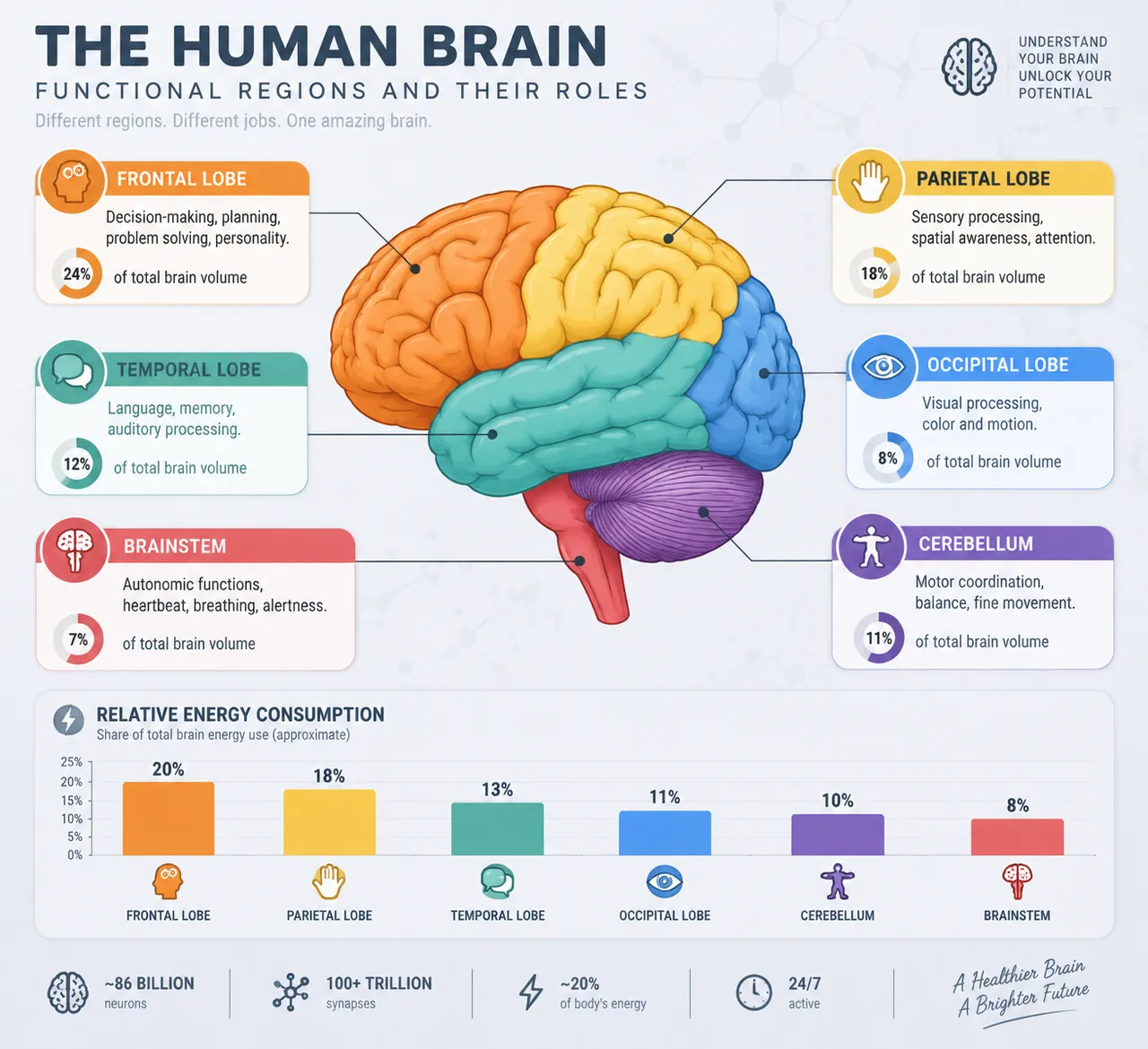
側面の脳ベクター図に六大機能野を分区して注記。前頭葉の意思決定、後頭葉の視覚などに引き出し線と体積比のバッジ、神経繊維のテクスチャの下地は明晰で厳密。
プロンプト全文(英語)
Scientific infographic poster mapping the functional regions of the human brain, front-view flat presentation. Layout: a large left-profile illustration of the human brain rendered in flat vector style, divided into color-coded functional zones with leader lines and labels: frontal lobe (decision-making, orange), parietal lobe (sensory, yellow), temporal lobe (language and memory, teal), occipital lobe (vision, blue), cerebellum (motor coordination, purple) and brainstem (autonomic functions, red). Each label card includes a one-line function description, a small flat icon, and a percentage data badge of brain volume share. A bottom bar chart compares relative energy consumption of each region. Color system: soft pastel region colors with stronger saturated versions for emphasis, on a cool pale gray background (#EEF2F7) with dark slate text (#263238). Typography: clean clinical sans-serif, bold region names, thin annotation lines in light gray. Background: subtle neural-network line texture with faint synaptic dots. Data feel: neurology atlas plate with precise leader lines. Lighting: soft neutral studio light, subtle inner shading on the brain, no harsh shadows. 4k
同じ画像を生成:
上のプロンプトをコピー → ChatGPTを開く → 貼り付けて送信(画像モデルは切り替え可) → 結果を待つ。
ChatGPTを開く ↗
詳しい手順は
チュートリアルへ。
よくある質問
この画像はどう再現するの?▾
上の英語プロンプトをコピーし、ChatGPTを開いて画像モデルに切り替え、プロンプトを貼り付けて送信します。モデルが似た結果を生成します。
どのAIツールを使えばいい?▾
推奨:ChatGPT。長い英語プロンプトを受け付ける対話型画像ツールなら、どれでも似た結果を出せます。
このプロンプトをカスタマイズできる?▾
はい。被写体、スタイル、色、構図の指定を自分のものに差し替えられます。説明文には通常、変更箇所のヒント(例:「XをYに置き換え」)があります。
実例画像は自由に使えますか?▾
実例画像は当サイトがこのプロンプトで紹介用に生成したものです。プロンプト自体は自由にコピー・利用できます。商用利用の場合は、使用するAIツールの条件をご確認ください。


