
インフォグラフィック 推奨:ChatGPT
サイエンス図表:深海の階層の長巻
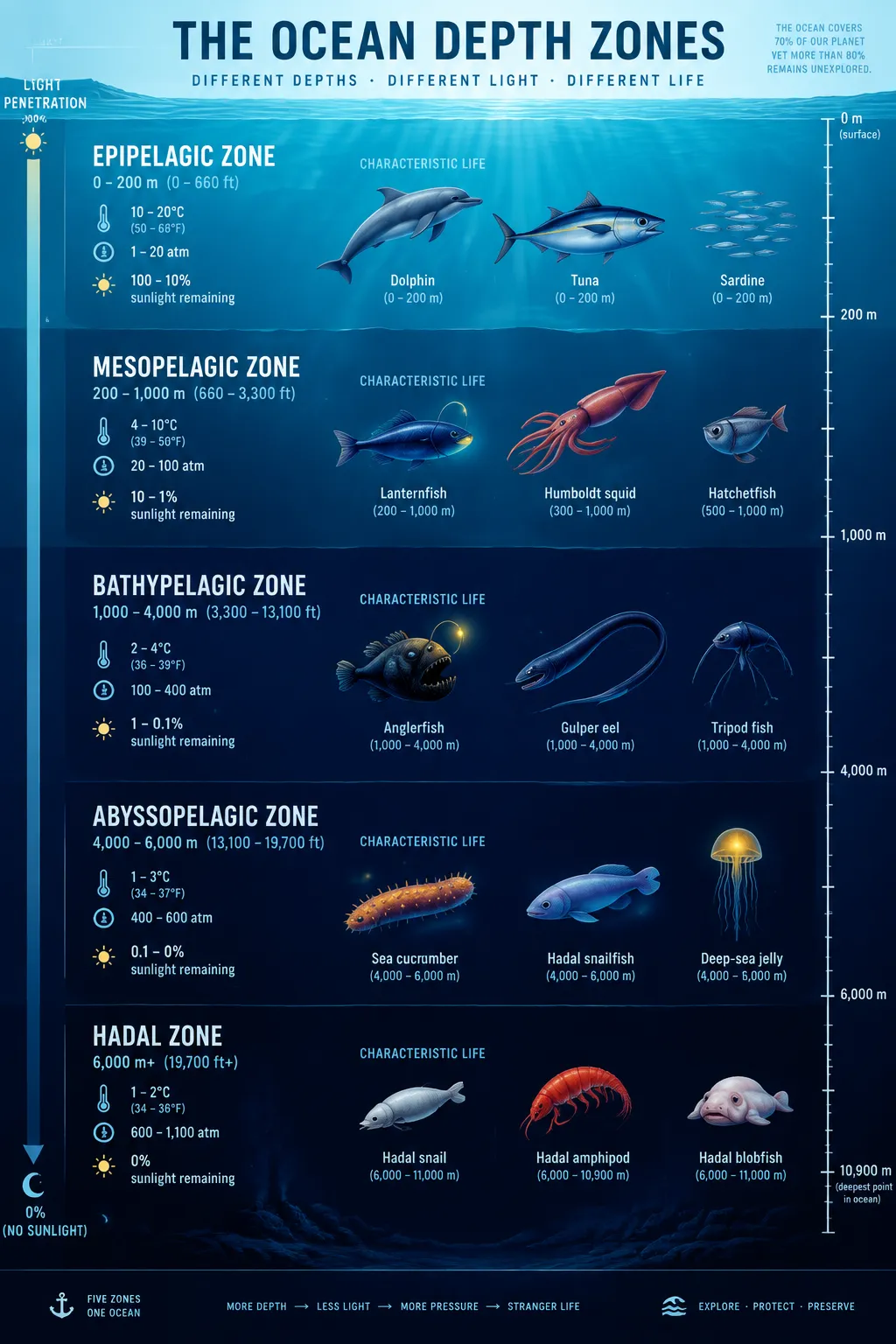
縦の断面が深海を五等分する。光の届く層から超深層まで深さ・水温・水圧を記し、イルカからチョウチンアンコールまでの生物シルエット、暗部に光る生物発光の点缀。
プロンプト全文(英語)
Scientific infographic cross-section poster of ocean depth zones, front-view flat vertical presentation. Layout: a tall vertical cross-section panel of the ocean divided into five horizontal bands: epipelagic (0-200m, sunlit), mesopelagic (200-1,000m, twilight), bathypelagic (1,000-4,000m, midnight), abyssopelagic (4,000-6,000m) and hadal (6,000m+), each band labeled with depth range, water temperature, pressure in atmospheres and percentage of sunlight remaining. Each zone shows small flat icons of its characteristic creatures: dolphins, tuna, lanternfish, giant squid, anglerfish, gulper eel, tripod fish, sea cucumber and snailfish. A right-side depth ruler with tick marks and a left-side light-penetration arrow complete the layout. Color system: gradient blues from bright cyan (#48CAE4) at the surface to deep indigo (#0B1B3D) at the bottom, with warm yellow accent icons in dark zones for bioluminescence. Typography: bold sans-serif headers per band, thin numeric data captions. Background: subtle water-line texture with faint vertical light rays from above. Data feel: marine biology textbook plate with precise scale. Lighting: top-down light shaft fading with depth, glow accents on bioluminescent icons. 4k
同じ画像を生成:
上のプロンプトをコピー → ChatGPTを開く → 貼り付けて送信(画像モデルは切り替え可) → 結果を待つ。
ChatGPTを開く ↗
詳しい手順は
チュートリアルへ。
よくある質問
この画像はどう再現するの?▾
上の英語プロンプトをコピーし、ChatGPTを開いて画像モデルに切り替え、プロンプトを貼り付けて送信します。モデルが似た結果を生成します。
どのAIツールを使えばいい?▾
推奨:ChatGPT。長い英語プロンプトを受け付ける対話型画像ツールなら、どれでも似た結果を出せます。
このプロンプトをカスタマイズできる?▾
はい。被写体、スタイル、色、構図の指定を自分のものに差し替えられます。説明文には通常、変更箇所のヒント(例:「XをYに置き換え」)があります。
実例画像は自由に使えますか?▾
実例画像は当サイトがこのプロンプトで紹介用に生成したものです。プロンプト自体は自由にコピー・利用できます。商用利用の場合は、使用するAIツールの条件をご確認ください。


