
インフォグラフィック 推奨:ChatGPT
サイエンス図表:六大茶類の階段
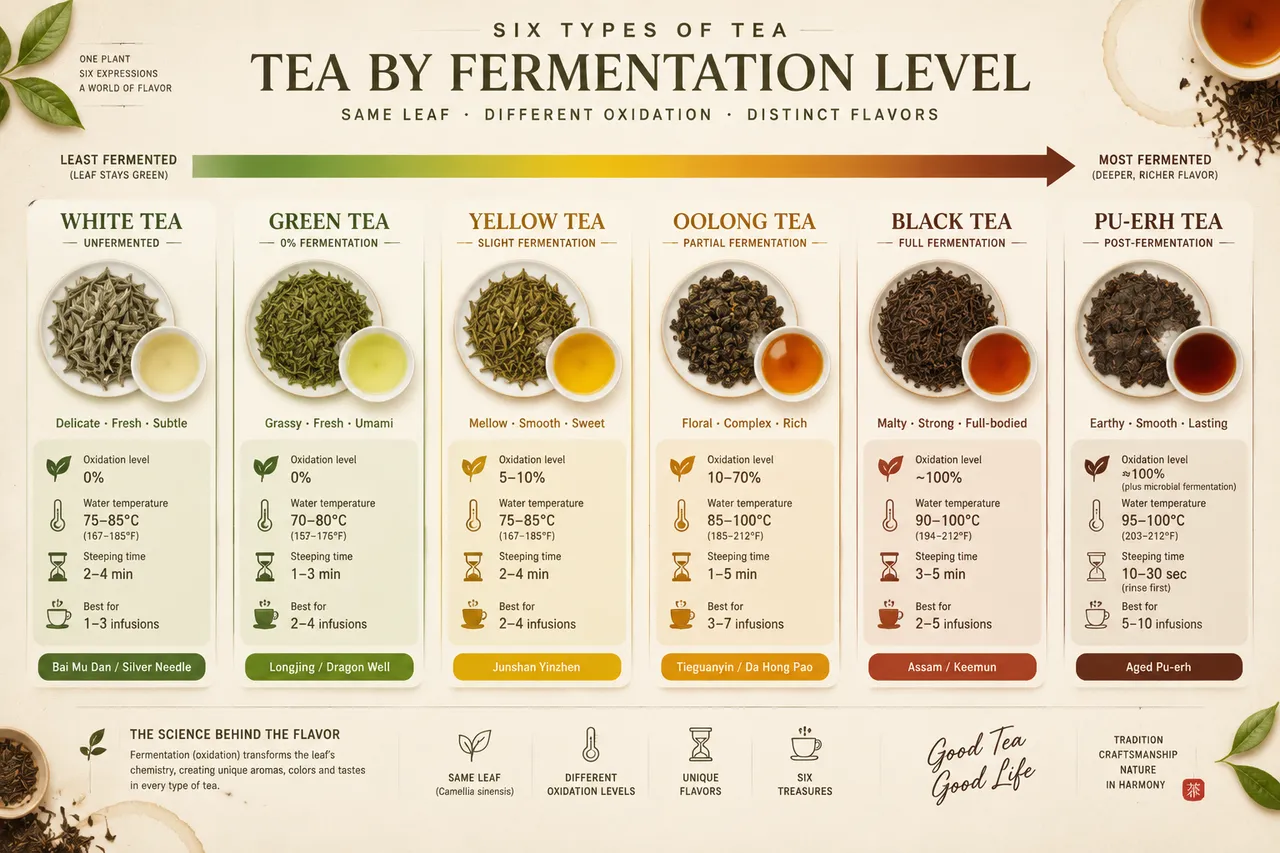
スペクトラムの階段が白茶からプーアル茶まで発酵度順に六大茶類を並べる。円形の小図が乾茶と水色を並べ、酸化率・湯温・浸出時間を記す。
プロンプト全文(英語)
Infographic poster presenting the six major types of tea arranged by fermentation level, front-view flat presentation. Layout: a horizontal spectrum bar running across the poster from left to right showing white tea (unfermented), green tea (0%), yellow tea, oolong tea (10-70% partial fermentation), black tea (full fermentation) and dark fermented pu-erh tea, each with a circular illustration of its dry leaf and brewed liquor color in a small cup, plus a data badge with oxidation percentage, brewing water temperature and steeping time. A gradient arrow above the bar runs from pale silver-green to deep amber-brown, and small flat icons of the tea leaf, thermometer, hourglass and cup appear at each station. Color system: fresh tea greens (#7CB342, #33691E) shifting through golden yellow (#F9A825) to deep brown (#5D4037), on an off-white background (#FBF7F0). Typography: elegant serif for tea names, clean sans-serif for data labels, clear hierarchy. Background: subtle dry-leaf texture with faint tea-stain rings. Data feel: tea-master reference chart with precise oxidation numbers. Lighting: warm soft light from the upper left, glossy cup highlights, gentle shadows. 4k
同じ画像を生成:
上のプロンプトをコピー → ChatGPTを開く → 貼り付けて送信(画像モデルは切り替え可) → 結果を待つ。
ChatGPTを開く ↗
詳しい手順は
チュートリアルへ。
よくある質問
この画像はどう再現するの?▾
上の英語プロンプトをコピーし、ChatGPTを開いて画像モデルに切り替え、プロンプトを貼り付けて送信します。モデルが似た結果を生成します。
どのAIツールを使えばいい?▾
推奨:ChatGPT。長い英語プロンプトを受け付ける対話型画像ツールなら、どれでも似た結果を出せます。
このプロンプトをカスタマイズできる?▾
はい。被写体、スタイル、色、構図の指定を自分のものに差し替えられます。説明文には通常、変更箇所のヒント(例:「XをYに置き換え」)があります。
実例画像は自由に使えますか?▾
実例画像は当サイトがこのプロンプトで紹介用に生成したものです。プロンプト自体は自由にコピー・利用できます。商用利用の場合は、使用するAIツールの条件をご確認ください。


