
인포그래픽 추천 대상: ChatGPT
과학 인포그래픽: 동물 속도 랭킹
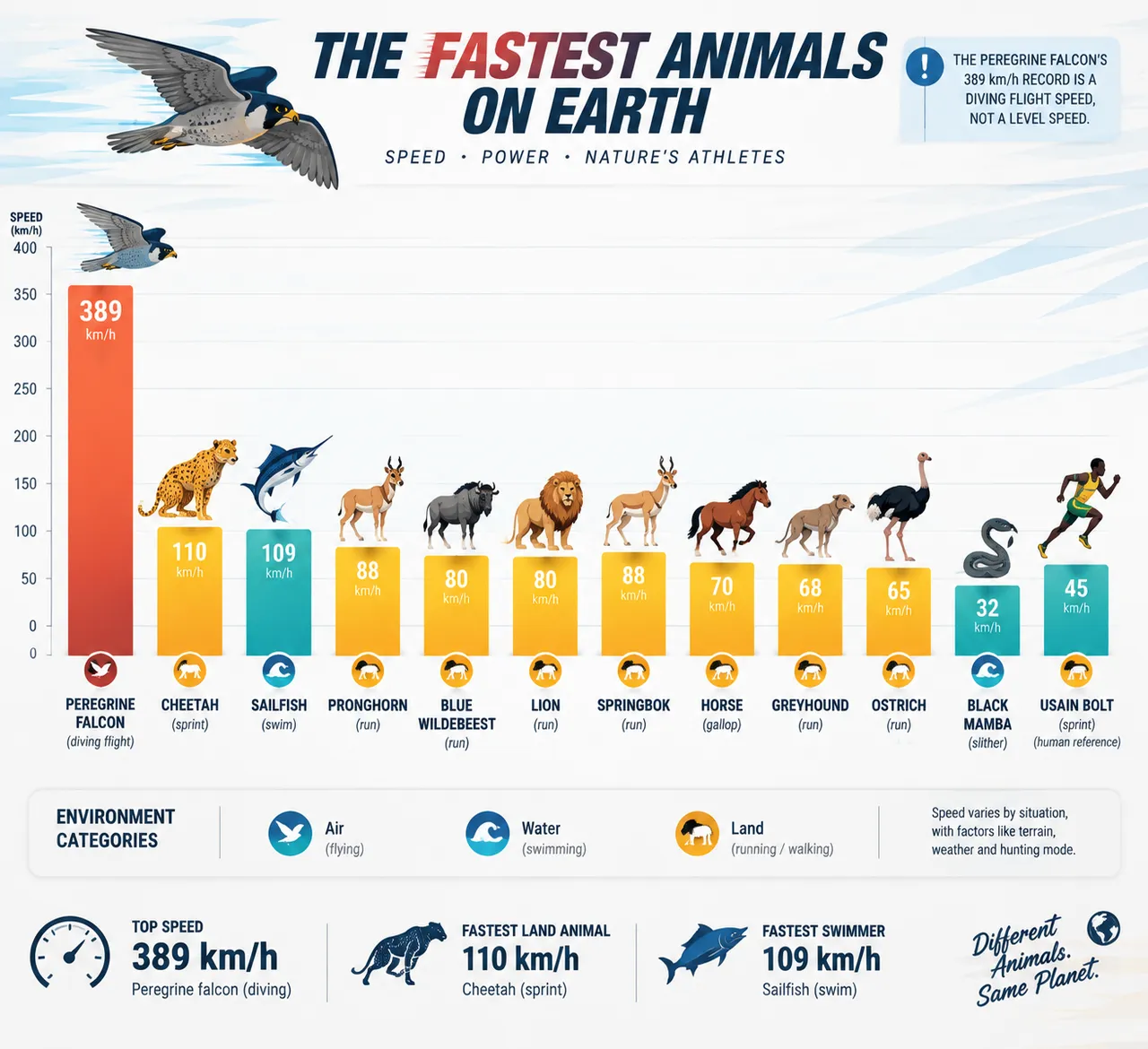
가로 막대그래프로 가장 빠른 열두 동물을 한눈에 보여주고, 송골매가 시속 389km의 급강하로 정상을 차지해요. 그라데이션 색 막대와 벡터 일러스트가 어우러져 역동적인 느낌을 살렸어요.
전체 프롬프트 (영문)
Infographic poster ranking the fastest animals on Earth, front-view flat presentation. Layout: a horizontal bar chart at the center with twelve bars sorted descending, each bar topped with a flat vector animal illustration: peregrine falcon (389 km/h dive), cheetah (110 km/h sprint), sailfish (109 km/h), pronghorn (88 km/h), blue wildebeest (80 km/h), lion (80 km/h), springbok (88 km/h), horse (70 km/h), greyhound (68 km/h), ostrich (65 km/h), black mamba (32 km/h) and human Usain Bolt (45 km/h) as a reference. Each bar shows the speed in bold data labels with a small environment icon for air, land or water. A top banner notes that the falcon's number records a diving flight, not level speed. Color system: energetic gradient bars from coral (#FF6B57) to gold (#F9C74F) and teal (#4ECDC4) per environment category, on white with charcoal text. Typography: bold sporty sans-serif numbers, playful animal name labels. Background: subtle motion-speed lines texture. Data feel: athletics-record chart with gridlines and category legend. Lighting: bright dynamic studio light, crisp bar edges, light shadows. 4k
같은 이미지 만들기:
위 프롬프트를 복사 → ChatGPT 열기 → 붙여넣고 전송(이미지 모델로 전환할 수 있어요) → 결과를 기다리면 돼요.
ChatGPT 열기 ↗
자세한 사용법은
튜토리얼을 참고하세요.
자주 묻는 질문
이 이미지는 어떻게 따라 만들 수 있나요?▾
위의 영문 프롬프트를 복사한 뒤 ChatGPT을(를) 열고 이미지 모델로 전환해 붙여넣고 전송하면, 모델이 비슷한 결과를 만들어 줘요.
어떤 AI 도구를 사용해야 하나요?▾
추천 대상: ChatGPT. 긴 영문 프롬프트를 지원하는 대화형 이미지 생성 도구라면 비슷한 결과를 얻을 수 있어요.
이 프롬프트를 내 입맛대로 바꿀 수 있나요?▾
네, 가능해요. 주제·스타일·색상·구성 단어를 원하는 주제로 바꾸면 돼요. 설명에는 보통 바꿀 수 있는 대표적인 지점(예: swap X for Y)이 안내되어 있어요.
예시 이미지를 자유롭게 사용할 수 있나요?▾
예시 이미지는 본 사이트가 이 프롬프트로 생성한 전시용 이미지예요. 프롬프트 본문은 자유롭게 복사해 사용할 수 있고, 상업적 이용 시에는 사용하는 AI 도구의 약관을 따라 주세요.


