
인포그래픽 추천 대상: ChatGPT
과학 인포그래픽: 여섯 가지 차의 계단
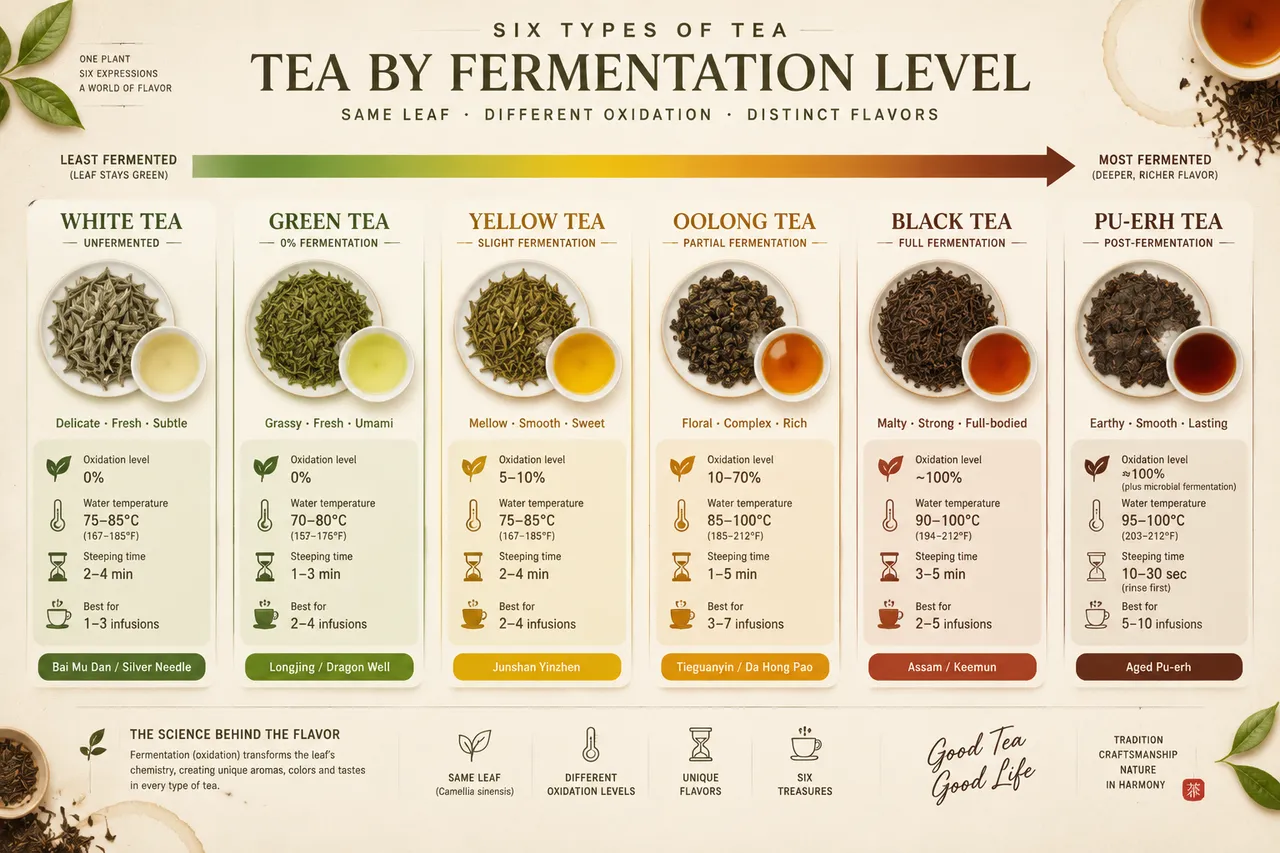
스펙트럼 계단이 백차부터 푸얼차까지 발효 정도 순으로 여섯 가지 차를 배치하고, 동그란 그림에 마른 찻잎과 우린 물색을 나란히 보여줘요. 산화율과 물 온도, 우리는 시간이 함께 표시돼요.
전체 프롬프트 (영문)
Infographic poster presenting the six major types of tea arranged by fermentation level, front-view flat presentation. Layout: a horizontal spectrum bar running across the poster from left to right showing white tea (unfermented), green tea (0%), yellow tea, oolong tea (10-70% partial fermentation), black tea (full fermentation) and dark fermented pu-erh tea, each with a circular illustration of its dry leaf and brewed liquor color in a small cup, plus a data badge with oxidation percentage, brewing water temperature and steeping time. A gradient arrow above the bar runs from pale silver-green to deep amber-brown, and small flat icons of the tea leaf, thermometer, hourglass and cup appear at each station. Color system: fresh tea greens (#7CB342, #33691E) shifting through golden yellow (#F9A825) to deep brown (#5D4037), on an off-white background (#FBF7F0). Typography: elegant serif for tea names, clean sans-serif for data labels, clear hierarchy. Background: subtle dry-leaf texture with faint tea-stain rings. Data feel: tea-master reference chart with precise oxidation numbers. Lighting: warm soft light from the upper left, glossy cup highlights, gentle shadows. 4k
같은 이미지 만들기:
위 프롬프트를 복사 → ChatGPT 열기 → 붙여넣고 전송(이미지 모델로 전환할 수 있어요) → 결과를 기다리면 돼요.
ChatGPT 열기 ↗
자세한 사용법은
튜토리얼을 참고하세요.
자주 묻는 질문
이 이미지는 어떻게 따라 만들 수 있나요?▾
위의 영문 프롬프트를 복사한 뒤 ChatGPT을(를) 열고 이미지 모델로 전환해 붙여넣고 전송하면, 모델이 비슷한 결과를 만들어 줘요.
어떤 AI 도구를 사용해야 하나요?▾
추천 대상: ChatGPT. 긴 영문 프롬프트를 지원하는 대화형 이미지 생성 도구라면 비슷한 결과를 얻을 수 있어요.
이 프롬프트를 내 입맛대로 바꿀 수 있나요?▾
네, 가능해요. 주제·스타일·색상·구성 단어를 원하는 주제로 바꾸면 돼요. 설명에는 보통 바꿀 수 있는 대표적인 지점(예: swap X for Y)이 안내되어 있어요.
예시 이미지를 자유롭게 사용할 수 있나요?▾
예시 이미지는 본 사이트가 이 프롬프트로 생성한 전시용 이미지예요. 프롬프트 본문은 자유롭게 복사해 사용할 수 있고, 상업적 이용 시에는 사용하는 AI 도구의 약관을 따라 주세요.


