인포그래픽 추천 대상: ChatGPT
과학 인포그래픽: 나비 생애 주기
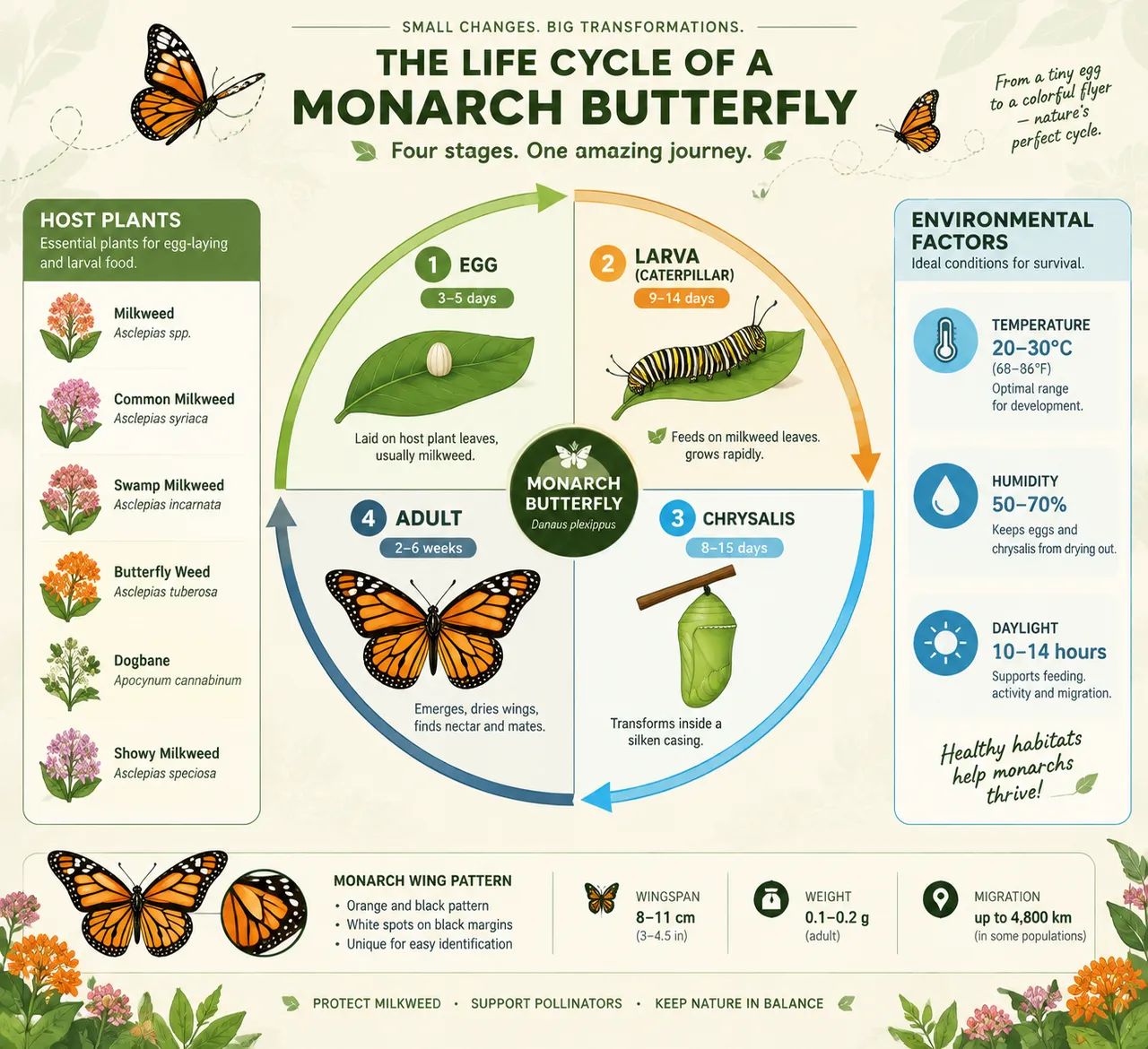
원형 순서도가 왕수염나비의 알, 애벌레, 번데기, 어른벌레 네 단계를 보여주고, 곡선 화살표로 이어 각 단계마다 소요 일수를 표시해요. 숙주 식물과 온습도 환경 카드도 함께 곁들여졌어요.
전체 프롬프트 (영문)
Educational infographic poster of the complete butterfly life cycle, front-view flat presentation. Layout: a large circular lifecycle diagram at the center divided into four quadrants connected by curved arrows: egg (tiny pearl on a green leaf), larva or caterpillar (striped body with leaf-eating icon), chrysalis (hanging pupa), and adult butterfly (wings spread), each quadrant with a flat vector illustration, stage duration badge in days, and a one-line behavior note. A monarch-butterfly species is used as the reference, with wing-pattern detail shown in a small callout. Side panels list six host-plant icons and three environmental-factors data cards for temperature, humidity and daylight. Color system: monarch orange (#F77F00), deep black (#22223B), leaf green (#80B918) and sky blue (#4CC9F0) on a soft botanical cream background (#FDF6EC). Typography: friendly rounded sans-serif, bold stage names, small caption text. Background: subtle leaf-vein texture with faint dotted flight paths. Data feel: nature-education chart with precise day counts. Lighting: bright natural daylight from the upper left, gentle leaf shadows, vivid colors. 4k
같은 이미지 만들기:
위 프롬프트를 복사 → ChatGPT 열기 → 붙여넣고 전송(이미지 모델로 전환할 수 있어요) → 결과를 기다리면 돼요.
ChatGPT 열기 ↗
자세한 사용법은
튜토리얼을 참고하세요.
자주 묻는 질문
이 이미지는 어떻게 따라 만들 수 있나요?▾
위의 영문 프롬프트를 복사한 뒤 ChatGPT을(를) 열고 이미지 모델로 전환해 붙여넣고 전송하면, 모델이 비슷한 결과를 만들어 줘요.
어떤 AI 도구를 사용해야 하나요?▾
추천 대상: ChatGPT. 긴 영문 프롬프트를 지원하는 대화형 이미지 생성 도구라면 비슷한 결과를 얻을 수 있어요.
이 프롬프트를 내 입맛대로 바꿀 수 있나요?▾
네, 가능해요. 주제·스타일·색상·구성 단어를 원하는 주제로 바꾸면 돼요. 설명에는 보통 바꿀 수 있는 대표적인 지점(예: swap X for Y)이 안내되어 있어요.
예시 이미지를 자유롭게 사용할 수 있나요?▾
예시 이미지는 본 사이트가 이 프롬프트로 생성한 전시용 이미지예요. 프롬프트 본문은 자유롭게 복사해 사용할 수 있고, 상업적 이용 시에는 사용하는 AI 도구의 약관을 따라 주세요.