인포그래픽 추천 대상: ChatGPT
과학 인포그래픽: 암석 순환
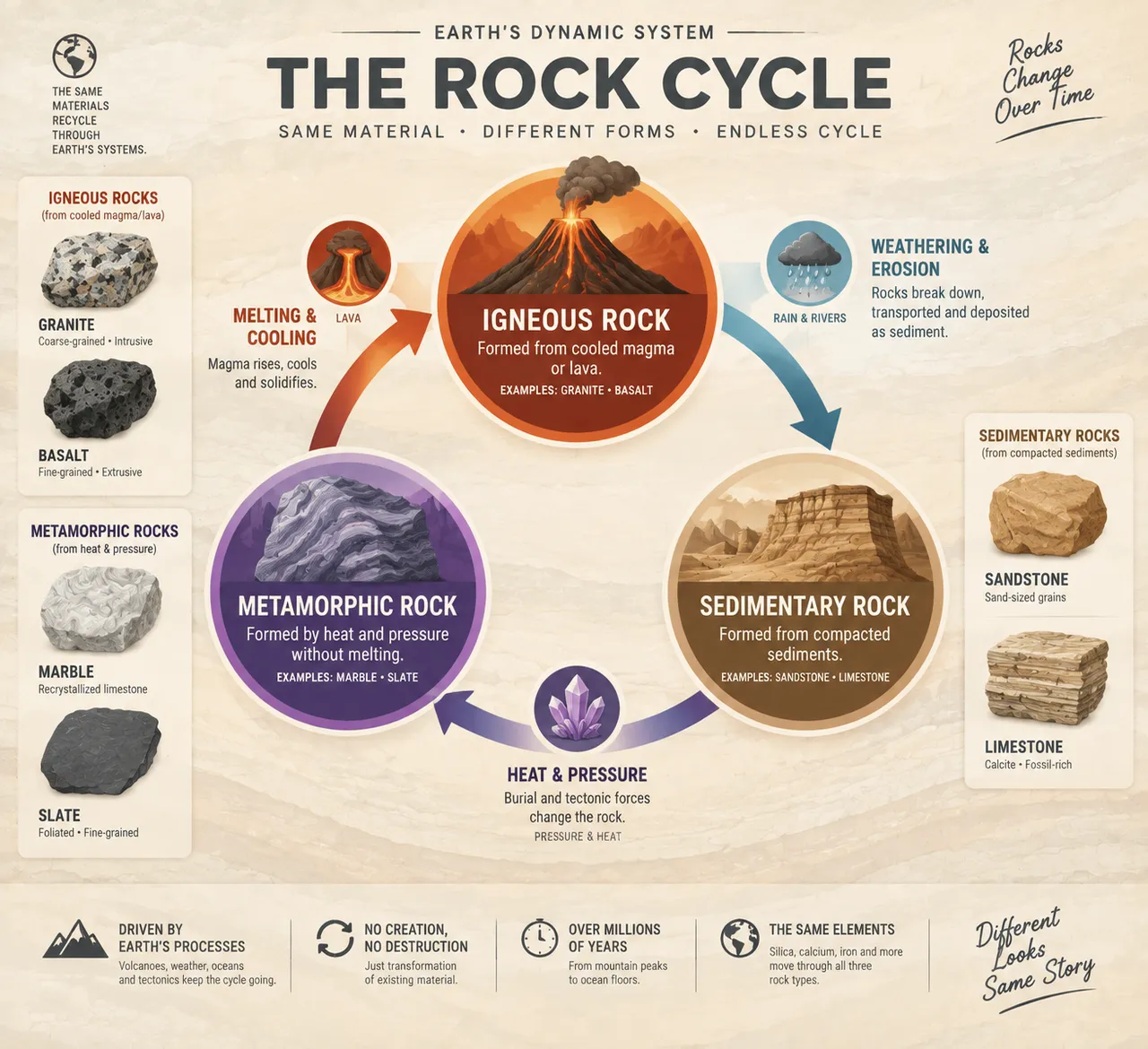
원형 순환도가 화성암과 퇴적암, 변성암을 잇고, 세 개의 곡선 화살표가 용융과 냉각, 풍화와 침식, 열과 압력에 의한 변성을 표시해요. 여섯 가지 암석 질감 샘플도 함께 실렸어요.
전체 프롬프트 (영문)
Scientific infographic poster of the rock cycle, front-view flat presentation. Layout: a large circular cycle diagram at the center with three major rock-type nodes: igneous (granite, basalt) shown with a volcano icon, sedimentary (sandstone, limestone) with layered cliff icon, and metamorphic (marble, slate) with a pressure anvil icon, connected by three curved arrows labeled melting and cooling, weathering and erosion, and heat and pressure, each arrow with a small process icon of a lava flow, falling rain and a glowing crystal. Small inset panels show six example rocks with flat texture swatches. Color system: igneous heat reds and deep grays (#D84315, #455A64), sedimentary warm browns (#A1887F), metamorphic purple-grays (#7E57C2), on a pale limestone background (#F5F0E8) with arrow gradients between nodes. Typography: bold geoscience sans-serif, clear process labels, small specimen captions. Background: subtle stratified-rock banding texture. Data feel: geology textbook diagram with curved directional arrows and node depth shading. Lighting: even diagrammatic light with soft node glows, crisp edges. 4k
같은 이미지 만들기:
위 프롬프트를 복사 → ChatGPT 열기 → 붙여넣고 전송(이미지 모델로 전환할 수 있어요) → 결과를 기다리면 돼요.
ChatGPT 열기 ↗
자세한 사용법은
튜토리얼을 참고하세요.
자주 묻는 질문
이 이미지는 어떻게 따라 만들 수 있나요?▾
위의 영문 프롬프트를 복사한 뒤 ChatGPT을(를) 열고 이미지 모델로 전환해 붙여넣고 전송하면, 모델이 비슷한 결과를 만들어 줘요.
어떤 AI 도구를 사용해야 하나요?▾
추천 대상: ChatGPT. 긴 영문 프롬프트를 지원하는 대화형 이미지 생성 도구라면 비슷한 결과를 얻을 수 있어요.
이 프롬프트를 내 입맛대로 바꿀 수 있나요?▾
네, 가능해요. 주제·스타일·색상·구성 단어를 원하는 주제로 바꾸면 돼요. 설명에는 보통 바꿀 수 있는 대표적인 지점(예: swap X for Y)이 안내되어 있어요.
예시 이미지를 자유롭게 사용할 수 있나요?▾
예시 이미지는 본 사이트가 이 프롬프트로 생성한 전시용 이미지예요. 프롬프트 본문은 자유롭게 복사해 사용할 수 있고, 상업적 이용 시에는 사용하는 AI 도구의 약관을 따라 주세요.